GEO Hack Suite | Every step to getting cited by AI, in one place
GEO Hack Suite | An all-in-one SaaS for AI Citation Monitoring × GEO Audit × AI Article Writing
Every step to getting cited by AI, in one place.
Search is moving from search results to AI answers. GEO Hack Suite is a full-stack GEO platform that automatically and regularly measures how your company is cited in ChatGPT, Perplexity, Gemini, Google AI Overviews, Bing AI and Claude (6 AI engines; 5 on the Light plan), with manual updates available at any time, and covers URL-level citation checks, GEO audits → rewrite priority → article production → impact measurement, and Slack and weekly email alerts. Use it in English, Japanese, or Simplified Chinese.
The article writing feature has learned from our know-how of producing more than 10,000 articles and from experience built since the early days of GEO and AIO (Google AI Overview).
GEO Hack Suite is a SaaS that measures how AI answer engines (ChatGPT, Perplexity, Gemini, Google AI Overviews, Bing AI and Claude) cite your website, and helps you improve it — monitoring, site diagnosis, rewrite prioritisation with Search Console, AI article drafting, and traffic measurement with Google Analytics. Its article drafting is built on know-how from more than 10,000 articles and on experience gained since the early days of GEO and AI Overviews.
A meeting is not required. Sign up and start using it right away, free for 7 days (a credit card is required when you start the free trial; if you cancel during the trial, you will not be charged). The video below is a recording of the actual product. If you would like an explanation, you can also book an online demo with our team (About 30 min, up to 60 min, free).
www.geo-hack-suite.appProduct demo playing automatically
A product demo recorded from the actual screens (Monitoring → Answer details → Competitor SoV → Outreach targets → GEO audit → AI article editing → Article writing → AI traffic).
News
Recent feature updates added for our customers.
New feature
You can now choose the day of the week for automatic measurement (weekly or every other week)
Until now, automatic measurement ran per question, every set number of days from the morning after each question was added, so the day of the week varied by question. We added “Measurement timing” at the top of AI Citation Monitoring: choose “Fixed day of the week” to measure all of a site's questions together on the morning of a fixed day every week (or every other week). This makes it easier to compare weekly numbers under the same conditions.
While a fixed day is set, per-question intervals are not used. If you stop using a fixed day, the previous intervals come back
Questions added mid-week are measured from the next chosen day. To see results right away, use “Update now” (it does not change the automatic schedule)
Standard and Pro can choose weekly or every other week; Light can choose every other week (any plan can choose the day of the week)
Improvement
“Cited Pages” can now be totaled for this month, last month, or a date range, and compared with the same period of the previous month
We added “This month”, “Last month”, and “Custom range (start and end dates)” to the periods in Cited Pages. You can now also choose what to compare with: “Same period last month”, “Same number of days just before”, or “Don't compare”. Choosing this month compares the 1st of this month through today with the 1st of last month through the same day, so you get a month-over-month comparison with matching days even early in the month.
This month and last month are compared with the same period last month by default; the last 30 and 90 days with the same number of days just before
The dates of both periods are shown above the list. If measurements for the comparison period are incomplete, the reason is shown instead of changes
“I searched with AI, and it only recommended our competitors.”
Invisible lost opportunities
Brand searches and comparisons made through AI are not broken out in GSC or GA4, so you cannot tell that you are not being cited.
The limits of manual work
Typing the same questions into multiple AIs every day and recording the results is not sustainable. What isn't measured doesn't get improved.
Fragmented measures
Monitoring, audits, content production, and impact measurement tend to be split across tools, fragmenting ownership and budgets.
FEATURES
From measurement to impact measurement, end to end with standard core features
Everything below is a standard feature, not an add-on. Monitoring, analysis, audits, content production, impact measurement, and alerts are all covered by a single contract.
* Supported AI engines: ChatGPT, Perplexity, Gemini, AI Overview, Bing AI, Claude (6 in total).
AI Citation Monitoring
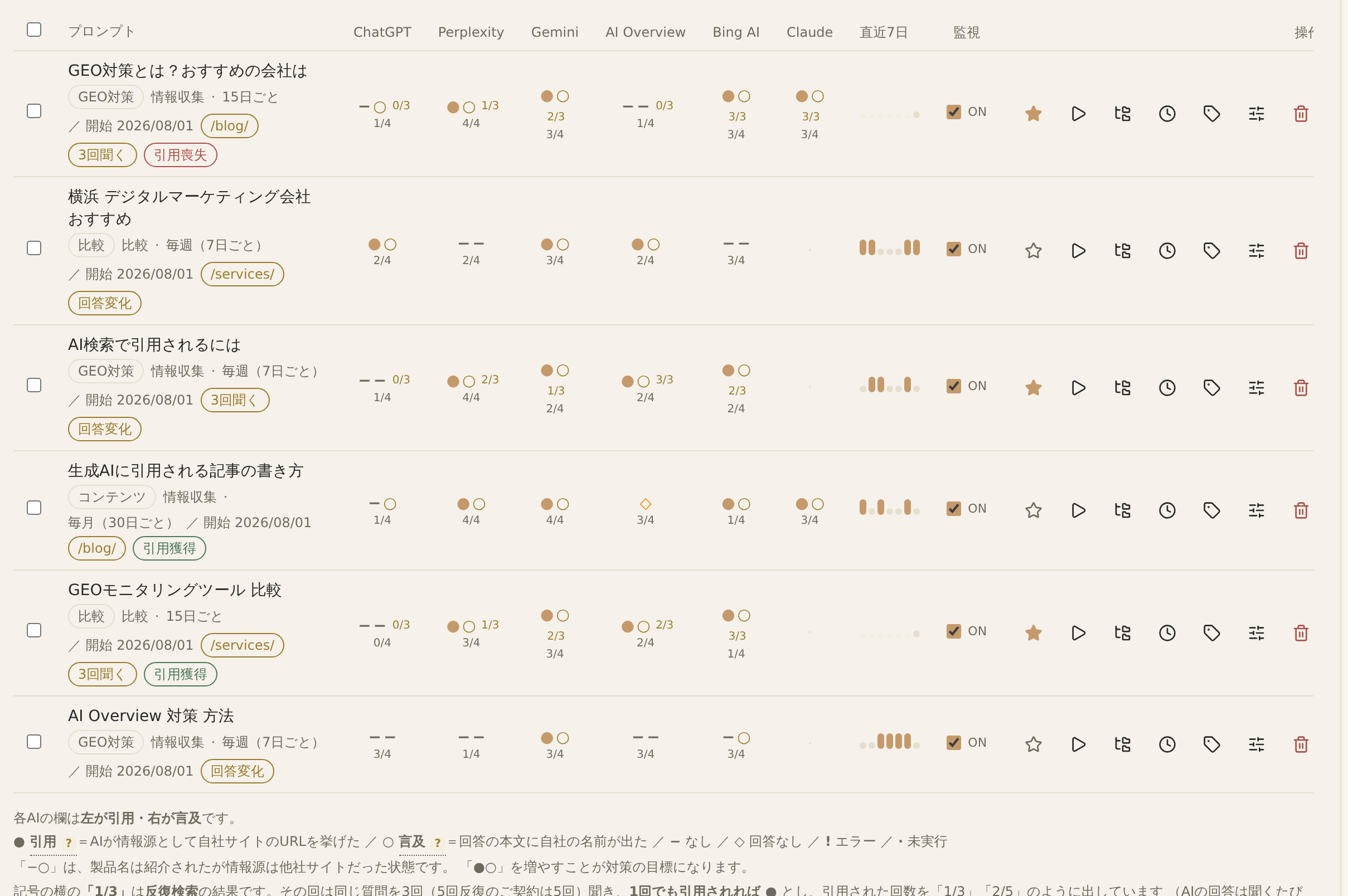
Just register the questions you want to monitor, and your citations, mentions, and citation positions across 6 AI search engines are measured automatically and regularly (every 15 days by default; the interval can be changed per question, you can also measure all of a site's questions together on a fixed day every week or every other week, and you can update manually whenever you want to check now). You can also read the original answers as they are. Your cited articles can be sorted in a per-article list (citations, questions, by AI), totaled for this month, last month, or a date range you choose, and compared with the same period of the previous month. You can also register and count your own external channels such as note. Each AI column also shows the number of citations in the last 4 runs (e.g. 3/4), so you can read the trend without being misled by a single fluctuation. There is also a paid “Repeat Search Option” that asks the same question 3 times per measurement (5 times for focus questions) to smooth out fluctuations.
See the full AI answer and its sources on the spot
Click a question in the list to open the actual answer the AI returned and the source URLs it cited. Switch between AIs with tabs and see what changed since last time. For answers that did not cite you, it shows the likely reason estimated from the results and what to do next, and you can also see the search terms the AI used to answer.
What one question tells you
✓Full answers from each AI and changes since last time (lost citations, changed answers)
✓Source URLs cited as evidence and their order
✓Whether you were cited or only mentioned in the text
✓Likely reasons for not being cited, with links to article writing and outreach targets
COMPARISON
Does one tool cover everything from measurement to articles to impact measurement?
How we differ from tools that only monitor AI citations and from manual consulting. The more individual measures you combine, the more the cost and operational effort add up.
Features / terms
GEO Hack Suite
Company A AI monitoring only (Japan)
Company B AI monitoring only (overseas)
Company C GEO consulting (manual)
Company D General-purpose SEO tool
AI Citation Monitoring
◯
6 AIs, automated
◯
Limited AI coverage
◯
△
Manual research
✕
Competitor benchmark (SoV)
◯
Detects unexpected competitors too
△
◯
△
✕
GEO site audit and improvement suggestions
◯
Up to 5,000 pages, scored out of 100 with suggestions
✕
✕
◯
Manual
△
SEO perspective only
Outreach target extraction (off-site measures)
◯
Extracted per question from the sources AI cites
✕
✕
△
Manual research
✕
Rewrite priority (GSC integration)
◯
✕
From pre-sales client audits to white-label delivery
Built-in features that let web production firms, ad agencies, and SEO companies turn GEO support for clients into a product.
✓
Client URL audit
Before a sales meeting, just enter a prospective client's URL to score how likely AI is to cite it, out of 100, with improvement points. Use the results directly in your proposal (Standard and above).
✓
White-label monthly reports
Export monthly report PDFs with your own logo. You can also change the tool name and company name shown at the top left of the dashboard to yours, so you can offer everything from regular reports and deliverables to screen sharing as your own service (Standard and above).
✓
Process and deliver freely via CSV
Download site audits (up to 5,000 pages), rewrite priority, and AI traffic as CSV, and turn them into proposals or reports in your own format in Excel or spreadsheets.
✓
Data separated by client
Manage each client securely in a separate project. You can limit which projects each member can see, so client contacts you invite cannot see other accounts. View-only invitations are unlimited and free.
✓
Operations run automatically
Once you win a client, just register the monitored prompts. With regular automatic measurement, alerts, and AI article writing, even a small team can handle multiple clients.
The actual audit screen: enter a URL to see the score, check breakdown, and improvement suggestions (the screen shows a sample site's results)
KEEP MEASURING
GEO is not something you measure once and stop
AI answers change every time you ask, even for the same question. When the same question was asked three times on the same day, only 9.2% of the source URLs overlapped on average (SE Ranking). The AI systems themselves also change month by month. ChatGPT switched to GPT-6 on October 7, 2026, and Google's AI Mode added new models five times in about three months.
In a survey of B2B companies, the share that felt GEO was working was 65.1% among those who had continued for less than six months and 83.2% among those who had continued for six months or more (Proberu, October 2026). The median time until a new article was first cited by AI was 14 days (Itera, October 2026).
GEO Hack Suite measures the same questions under the same conditions on a regular schedule and records how each AI changes.
Automatic measurement (every 15 days by default; as often as every 7 days on Standard and Pro)
Differences from the previous run, and trends for each AI
Repeat search, which makes you less likely to be misled by the swings of a single result (paid option)
* The surveys show a relationship between how long companies continued and whether they felt an effect. They do not show that continuing guarantees results.
OUR OWN SITE
What we found and fixed on our own site
Jinrai Inc. measures its own website (jinrai.co.jp) with GEO Hack Suite. When we asked 72 questions to 5 AI engines (October 28 – November 3, 2026; 1,425 answers), we found two things.
01
The pages being cited were not the ones we intended.
Of the 92 Perplexity answers that cited our site, 68 contained URLs of English duplicate pages automatically created by a translation tool.
02
Being cited did not mean our name was mentioned.
Of the 285 answers that cited our site, 171 (60.0%) did not mention our company name in the answer text.
On November 5 we redirected the duplicate pages to the Japanese pages. In the next measurement (November 11–12), answers containing duplicate-page URLs fell from 90 to 56 overall, and from 68 to 21 on Perplexity.
You can't tell which pages are used as sources, or whether your company name appears, until you measure. This is an example from our own site and does not guarantee the same results.
PRICING
Everything you need, included from the start
A meeting is not required; sign up and try it free for 7 days. You can cancel at any time, and annual billing saves about 12% (prices exclude consumption tax). Annual billing is invoiced as a lump sum.
Light
Start by making your site's AI citations visible
¥14,800/month (excl. tax)
¥16,280/month incl. tax
Annual ¥156,000/year (¥171,600 incl. tax / ¥13,000 per month, saving ¥21,600 a year)
✓80 monitored prompts (5 AIs, automatic, total across all sites)
✓Automatic monitoring interval: as often as every 14 days (every 15 days by default)
✓Manual updates: 3 per month (up to 20 prompts each)
✓Competitor benchmark: 3 companies
✓GEO audits: 3 per month (up to 5,000 pages)
✓AI article writing: 5 per month (including WordPress posting)
✓AI article editing (optimizing existing pages for GEO): 10 per month
✓GSC/GA4 integration and rewrite priority
✓Outreach targets (off-site measures, listing point audits)
Run measure → audit → produce → measure impact every week
¥39,800/month (excl. tax)
¥43,780/month incl. tax
How it works · HOW IT WORKS
From sign-up to running smoothly
No meeting or advance application is required. You can start straight from sign-up. Your first measurement starts as soon as you finish the initial setup, and results usually appear within a few minutes to about fifteen minutes. There is a 7-day free trial, and if you cancel during the trial, you will not be charged.
1Check it in a demo (optional)
The product demo video above (a recording of the actual screens) lets you check every screen before signing up. Feel free to skip this step and go straight to sign-up. If you would like an explanation, our team can walk you through it with an online demo (About 30 min, up to 60 min, free) using your own site as an example.
2Create an account
Enter the contact person's name, company name (trade name), and phone number, and agree to the Terms of Service and Privacy Policy. No charges are incurred at this point. This service is for businesses (corporations and sole proprietors).
3Choose a plan
When you choose a plan in the dashboard, a screen showing the billing date and amount appears. Register a credit card and continue to start your 7-day free trial.
4Register the questions to monitor
Register the questions prospects are likely to ask AI. Bulk registration from industry templates and CSV import are supported. Connect Search Console, and it also suggests questions based on terms people actually search for. You can run a GEO audit right away at this point.
5Connect Search Console and GA4
Just connect your Google account to start using rewrite priority and AI traffic analysis. Past data is imported retroactively.
6Improve every week
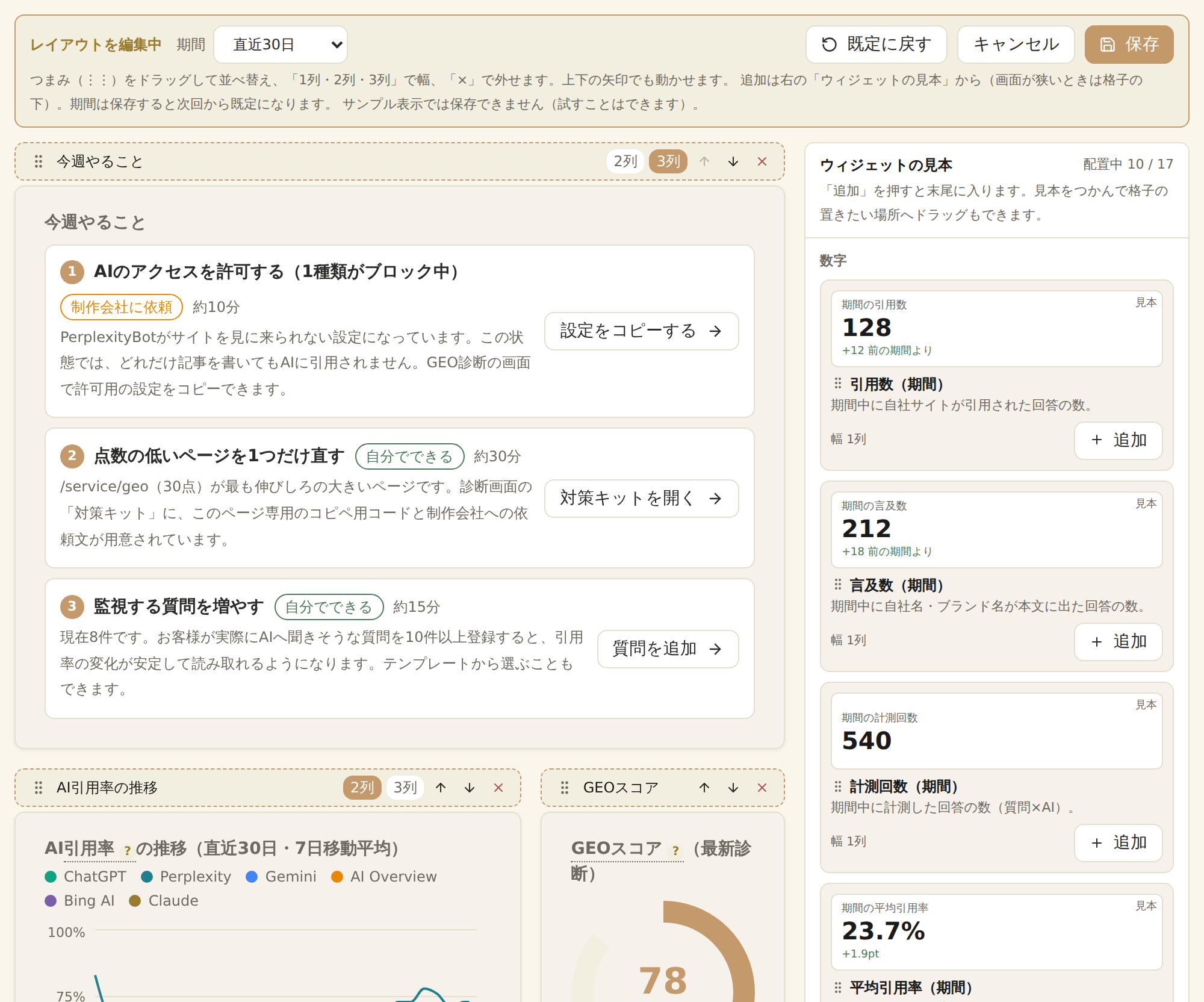
Measurements run automatically at the interval you set. Major changes are sent via Slack and email, and every Monday you receive last week's summary. The dashboard's “This week's tasks” shows up to 3 recommended actions, ordered by impact and with estimated time.
About the 7-day free trial
A credit card is required when you start the free trial (not when you create an account or register your site).
If you cancel during the free trial, you will not be charged.
The first monthly fee is charged on the day after the free trial ends, and the subscription then renews automatically every month until you cancel.
Get our free brochure on features and benefits
A single document explaining what AI citation monitoring is and what changes when you adopt it, along with the 14 core features, their benefits, and how to get started. Use it as is for internal sharing or approval (can be saved as PDF).
✓The risk of not being cited in the age of AI search, and an overview of countermeasures
✓Designed for agencies and multi-client operations
FAQ
Frequently asked questions
QIs there a minimum contract term?
ANo. It is a monthly subscription, and you can cancel at any time from the dashboard. There is no minimum term, so you can use it for just one month. Applications include a 7-day free trial, and if you cancel during that time, you will not be charged at all.
QCan I try it for free? Are there initial fees?
AThere is a 7-day free trial. We do not charge initial or setup fees. The first fee is charged on the day after the trial ends, and the subscription then renews automatically every month until you cancel.
QWhat happens to my data after I cancel?
AEven after canceling, you can use the service until the last day of the paid period (the day before the next renewal date). There is no refund for that period (no prorated refunds). Your data is retained for 31 days after cancellation, and if you resume within that time, it can be restored to its state before cancellation. After 31 days, it is deleted and can no longer be restored. You can change plans at any time from the dashboard (if you use the Repeat Search Option, our team handles the change).
QCan I try it before signing up? Do I need a meeting?
AA meeting is not required. You can try it straight from sign-up. During the free trial, usage is capped (20 monitored prompts / 2 manual updates (up to 20 prompts each) / 10 individual re-measurements per day / 2 AI articles / 3 AI article edits / 2 GEO audits), but there are no feature restrictions. You need to create an account and register a payment method (you will not be charged during the free trial). If you would like an explanation, you can also book an online demo with our team (About 30 min, up to 60 min, free).
QWhat questions (prompts) should I register for monitoring?
AQuestions prospects are likely to ask AI, such as “best ◯◯” or “what is ◯◯”. Registering the questions your sales and support teams receive is effective. Industry templates and bulk registration by CSV are also supported.
QDo I need to provide my own API keys for the AI tools?
On regular plans, the service runs on keys issued by us, so you do not need to provide any. We also support BYOK (Bring Your Own Key), which uses your own API keys: you pay the AI usage fees directly, and in return you can operate at high volume without worrying about limits. Please contact us to set up BYOK.
Practical GEO know-how, shared in our columns
On our blog, we regularly share the thinking and concrete steps for getting cited in AI search.
The CSV can also be exported with the period and comparison chosen on screen
New feature
We added the “Repeat Search Option”, which asks the same question 3 times per measurement to reduce fluctuations in results
AI answers vary each time you ask, even for the same question. The Repeat Search Option asks the target questions 3 times per measurement and counts them as “cited” if cited even once, showing the number of citations in each AI column like “2/3”. You can choose “focus questions” (questions marked with ★, in units of 10) or “all questions” (asked 3 times once every 2 weeks or weekly), and focus questions can also be contracted to be asked 5 times.
Prices (excl. tax) start at ¥3,500 per month per 10 focus questions (¥3,850 incl. tax; ¥3,000 per month with annual billing, ¥3,300 incl. tax). All questions are a flat price per plan, and weekly is available on Standard and Pro
If you have a card-paid plan, you can apply on the spot from Settings → Plan & Billing (prorated until your next renewal date; cancel any time)
“Update now” can also ask 3 times (it just uses 3 of your monthly manual updates, with no extra charge)
✓Search terms the AI used (ChatGPT, Gemini, Claude, Bing AI)
Competitor benchmark and citation source analysis
Calculates competitors' citation share (SoV) for the same questions. It also ranks the sites AI cites most, revealing “unexpected rivals” outside your SoV tracking and the patterns of winning pages. Sources are broken down by type (your site, competitors, comparison sites, media, etc.), and opening a type shows the actual cited URLs and number of answers.
Outreach targets (off-site measures)
AI answers draw not only on your own site but also on third-party pages such as comparison sites and industry media. We list the external sites AI actually cited for each question and prioritize the ones you should approach about being listed. We then analyze each page to show which comparison table and which position you should appear in, and prepare the URL of that section and a draft request email.
We don't stop at “please list us”
✓Determines the number of listing slots and the listing status of you and your competitors from the actual pages
✓Generates a URL that opens the exact section (so you can tell the site owner “it's right here”)
✓Automatically extracts contact points for listing and press inquiries
URL Inspection
Enter a URL to look up which AIs and which questions cited that page (last 90 days). It also scores how likely AI is to cite the page, out of 100, on the spot. Works for client and competitor URLs too (Standard and above).
GEO site audit
Audits AI bot permissions in robots.txt, structured data, answer capsules, heading structure, and more, scored out of 100 (based on Google's official guidelines). Audit up to 5,000 pages at once with live progress. PDF reports and CSVs of all pages are generated automatically.
A “fix kit” that doesn't stop at pointing out problems
✓Automatically generates paste-in code for each page (structured data, FAQs, alt text, etc.)
✓Create a request you can send straight to your web production firm in one click
✓Including time required and whether you can do it yourself
AI article editing (optimizing existing pages for GEO)
Just paste the text of an existing recruitment page, store page, or service page, and it will be reshaped into a form AI is more likely to cite. Choose a genre, and it adds a conclusion-first summary (answer capsule), clearer headings, tables and bullet lists, FAQs, and structured data, following the questions people are likely to ask AI about that page. It never invents facts that are not in the original and leaves missing items marked [Needs review], preventing misinformation from being published.
Supported genres (8)
✓Recruitment pages / store pages / service pages / company profiles
✓Product pages / case studies / columns / FAQs
✓Three editing strengths (from additions only to a full restructure)
Rewrite Priority
Automatically classifies the articles that will grow if you fix them into tiers A–D using Search Console data, so you can start with quick wins. The list can also be exported as CSV for internal sharing or client reports.
AI article writing
From keyword to outline, body, and WordPress draft, all in one flow. The article writing feature has learned from our know-how of producing more than 10,000 articles and from experience built since the early days of GEO and AIO (Google AI Overview), so every article includes by default the “template” AI likes to cite (structure, headings, FAQs, structured data). Before publishing, it is scored on two axes: a GEO score (for AI) and a reader score (for people).
Built in (applied to every article by default)
✓Answer capsule (conclusion-first summary)
✓Automatically generates 5+ FAQs and fills in any gaps
✓Always includes FAQPage structured data (JSON-LD)
✓Outline and heading standards designed from know-how built over 10,000+ articles
Reader-perspective check (two-axis evaluation)
Scores not only how likely AI is to cite the article but also how easy it is for people to read, out of 100. It points out long sentences and unexplained jargon in your actual text, and the AI suggests rewrites. Suggestions can be applied to the body in one click, and for suggestions without a rewrite example, the AI rewrites the passage without changing headings or facts.
Just select a directory in the header, and GEO audits, rewrite priority, AI traffic analysis, AI Citation Monitoring, and outreach targets switch to the figures for that section only. Even on sites with separate pages per product, you can see the situation by business unit or product.
Measuring AI-referred traffic
Automatically classifies traffic from ChatGPT, Perplexity, and others in GA4 and shows which pages it landed on. It also counts how many events such as inquiries and document requests came via AI, and marks GA4 key events (formerly conversions). Export CSVs by day, page, and event to show the link to results in numbers.
A dashboard you can build yourself
Rearrange, resize, add, and remove 17 kinds of widgets by drag and drop, including citation rate over time, SoV (overall and per-AI tabs), AI-referred sessions, citations, mentions, measurement runs, average citation rate, top 5 cited articles, citation rate by question, and SoV gap with competitors. Pick widgets visually from the “Widget samples” panel on the right of the editing screen, and switch the period (last 7, 30, or 90 days). Layouts are saved per user, so executives, practitioners, and agencies can each see what they need.
Examples of available widgets (17 kinds)
✓Citations, mentions, measurement runs, and average citation rate (totals for the period)
✓SoV (overall and per-AI tabs) / citation rate over time / AI-referred sessions
✓Top 5 cited articles / citation rate by question (top and bottom) / SoV gap with competitors
Alerts and weekly reports
Automatically notifies you on Slack and by email of important changes such as lost citations, SoV reversals, and score drops. Lost-citation alerts are sent only when you are not cited twice in a row and your citation rate drops, so you are not thrown off by a single fluctuation. Every Monday you receive a summary of last week's citations, so you stay informed without logging in.
As far as our research in Japan and overseas shows, this is still the only tool that runs this entire loop in Japanese (our own research). The app is also available in English and Simplified Chinese.
✕
△
◯
SEO perspective
GEO editing of existing pages
◯
8 genre templates
✕
✕
◯
Manual, expensive
✕
AI article writing (through WordPress posting)
◯
Built-in templates that AI likes to cite
✕
✕
◯
Manual, expensive
△
General-purpose AI writer
Measuring AI-referred traffic (GA4)
◯
Down to page level
✕
△
△
✕
Alerts and weekly reports
◯
Slack + email
△
△
◯
Regular meetings
△
Data export as CSV
◯
Audits, rewrites, AI traffic
△
Partial
◯
✕
Reports only
◯
Japanese UI (English and Simplified Chinese also available), designed for the Japanese market
◯
◯
✕
English only
◯
◯
Approximate monthly cost
From ¥14,800
Around ¥8,000
Around ¥30,000
¥150,000–500,000/month
From a few thousand yen
* Based on our own research as of July 2026. Companies A–D are anonymized, general comparisons of representative services in Japan and overseas by feature category, and do not refer to any specific product or service.
Annual ¥420,000/year (¥462,000 incl. tax / ¥35,000 per month, saving ¥57,600 a year)
✓200 monitored prompts (all 6 AIs, automatic, total across all sites)
✓Automatic monitoring interval: as often as every 7 days (weekly; every 15 days by default)
✓Manual updates: 7 per month (up to 50 prompts each)
✓Competitor benchmark: 5 companies
✓GEO audits: 7 per month (up to 5,000 pages)
✓Client URL audit (GEO scores for external sites)
✓AI article writing: 20 per month
✓AI article editing (optimizing existing pages for GEO): 40 per month
✓Monthly reports (your own branding, PDF export)
✓GSC/GA4 integration and rewrite priority
✓Outreach targets (off-site measures, listing point audits)
✓White-label monthly reports (your logo, for client distribution)
The monthly number of AI article edits was not previously listed in the price table. It has been stated since September 2026.
Enterprise
Limits designed individually for your scale
Custom quote
✓Limits for monitored prompts, AI article writing, GEO audits, and more are set individually to match your scale
✓Includes measurement across all 6 AIs, white-label reports, and client URL audits
✓Payment by invoice (the monthly fee is quoted individually based on your limits)
✓Repeat search (asking the same question several times per measurement) can also be set in your contract, including the number of times (2–5), targets, and frequency
✓For companies with many monitored questions, multiple brands, and large-scale agency operations
AI answers vary each time you ask, even for the same question. With this option, the same question is asked 3 times per measurement (5 times can be chosen for focus questions), and if it is cited even once it counts as “cited”, with the number of citations shown in each AI column like “2/3”.
Scroll the table sideways to see the price columns
Target
Unit
Times asked
Monthly (per month)
Annual (per month)
Focus questionsOnly questions marked with ★. Charged by number of questions
Per 10 questions
3 times (every automatic run)
¥3,500¥3,850 incl. tax
¥3,000¥36,000/year (¥39,600 incl. tax)
Per 10 questions
5 times (every automatic run)
¥7,000¥7,700 incl. tax
¥6,000¥72,000/year (¥79,200 incl. tax)
All questions, once every 2 weeksAll registered questions. A flat price per contracted plan
Light plan
3 times (up to once every 2 weeks)
¥8,500¥9,350 incl. tax
¥7,500¥90,000/year (¥99,000 incl. tax)
Standard plan
3 times (up to once every 2 weeks)
¥27,000¥29,700 incl. tax
¥23,500¥282,000/year (¥310,200 incl. tax)
Pro plan
3 times (up to once every 2 weeks)
¥53,000¥58,300 incl. tax
¥46,500¥558,000/year (¥613,800 incl. tax)
All questions, weeklyQuestions measured every 7–13 days are also asked 3 times each time. Standard, Pro only
Standard plan
3 times (weekly)
¥54,000¥59,400 incl. tax
¥46,500¥558,000/year (¥613,800 incl. tax)
Pro plan
3 times (weekly)
¥106,000¥116,600 incl. tax
¥93,000¥1,116,000/year (¥1,227,600 incl. tax)
✓“Update now” (manual update) can also ask 3 times. It uses 3 of your monthly manual updates, with no extra charge
✓If you have a card-paid plan, you can apply on the spot from Plan & Billing in settings (except during the free trial)
✓When you apply, the prorated amount up to your next renewal date is charged, and it then renews on the same day as your plan. You can cancel at any time, and the remaining days are deducted from your next invoice (if there is no next invoice, e.g. because you cancel your plan, no deduction or refund is made)
✓Changes to your plan or billing cycle while using the option are handled by our team (the option price is adjusted accordingly)
All questions: “once every 2 weeks” vs. “weekly”
All questions, once every 2 weeks
All questions, weekly
How often questions are asked 3 times
Up to once every 2 weeks
Every automatic run (as often as every 7 days)
Questions measured every 15 days (default)
3 times every run
3 times every run (no difference)
Questions measured every 7–13 days
3 times only every other run (once in between)
3 times every run
Times per month a 7-day question is asked 3 times
About 2 times a month
About 4 times a month
Available plans
Light, Standard, Pro
Standard, Pro
Monthly price (excl. tax / incl. tax)
Light ¥8,500 (¥9,350 incl. tax) / Standard ¥27,000 (¥29,700 incl. tax) / Pro ¥53,000 (¥58,300 incl. tax)
Standard ¥54,000 (¥59,400 incl. tax) / Pro ¥106,000 (¥116,600 incl. tax)(about twice the price for the same plan)
If many of your questions are measured every 7 days, choose “Weekly”; if you use the default every 15 days, “once every 2 weeks” is enough.
* Large figures are prices excluding tax, with tax-inclusive amounts in smaller text (for annual billing, the annual amount and its tax-inclusive amount). Annual prices apply when your plan is billed annually (the annual amount is invoiced in full at renewal).How often and how we measure is published in How we measure.
Predictable costs:There are no usage-based charges. Additional editor seats and the Repeat Search Option are optional paid add-ons you apply for only if you want them. There are no initial fees or minimum terms, and you can cancel at any time from the dashboard. How often and how we measure, and the limitations, are published in How we measure.
For those with their own API keys (BYOK plans)
BYOK (Bring Your Own Key) plans are for customers who provide their own API keys for OpenAI, Anthropic, and others. You pay the AI usage fees directly, and in return you can operate at high volume without worrying about limits, while seeing and managing costs yourself. You can adjust usage fees by limiting the number of AIs monitored or the frequency. Please contact us through a demo request or inquiry to get started.
BYOK Light
Start small and manage costs yourself
¥9,800/month (excl. tax)
¥10,780/month incl. tax
Annual ¥103,200/year (¥113,520 incl. tax / ¥8,600 per month, saving ¥14,400 a year)
✓250 monitored prompts (5 AIs, total across all sites)
* The AI usage fees shown are estimates of what you pay directly to AI providers (when using the full limits). They drop significantly if you limit the number of AIs monitored (e.g. only 2) or the frequency (e.g. weekly). Compared with all-inclusive plans, these suit high-volume use and in-house cost management.
During the free trial, usage is capped (20 monitored prompts / 2 manual updates (up to 20 prompts each) / 10 individual re-measurements per day / 2 AI articles / 3 AI article edits / 2 GEO audits). There are no feature restrictions, including supported AIs, competitor registration, integrations, and reports.
You can cancel at any time from Settings → Plan & Billing in the dashboard.
ASEO aims to raise your ranking in search results, while GEO aims to have AI cite your company as a source when it generates answers. AI chooses sources by criteria other than search ranking, so you may not be cited even if you rank highly. The service measures your citation status and shows what to improve.
QIs GEO Hack Suite an LLMO analysis tool (LLMO tool)?
AYes. GEO tools, LLMO analysis tools, AIO tools and AI visibility tools are different names for the same thing: tools that measure how AI answers treat your company. GEO Hack Suite asks your registered questions to 6 AI engines and records citations of your site and mentions of your company name separately.
QHow is it different from overseas tools such as Profound?
AThe admin screens and support are in Japanese, prices are published in yen starting at ¥14,800/month (excl. tax), and you can go from measurement to article improvement and impact checks in a single screen. Some overseas tools are ahead in the number of AI engines or features they cover. Please choose the one that fits your goals.
QWhich AIs are supported?
AWe support ChatGPT, Perplexity, Gemini, AI Overview, Bing AI, Claude. We send questions to each AI's API and record the answer text and source URLs returned. Because each AI cites sources differently, we measure them separately.
QCan I measure how my company is mentioned in ChatGPT?
AYes. It regularly asks ChatGPT your registered questions and records the answer text, mentions of your company name, citations of your site, and the source URLs. You can measure the same questions in Perplexity, Gemini, AI Overview, Bing AI, Claude as well (5 AI engines on the Light plan).
QWhich numbers show my AI visibility (how I appear in AI answers)?
AYou can check two numbers for each question and each AI: the share of answers that cite your site (citations) and the share that mention your company name (mentions). We also record how these numbers change over time, competitors named for the same question, and the pages used as sources.
QDoes it support Japanese?
AYes. You can measure with questions in Japanese, and the admin screens and support are also in Japanese.
QDo you ask the same question many times and take an average?
ABy default, each measurement asks each AI every registered question once and records the answer. When we repeatedly asked the same questions ourselves, whether your site was cited matched in 4 out of 5 runs on average. A single measurement gives a good sense of the trend, but results can change each time you ask, so please check them together with the trend across regular measurements. If you want to reduce fluctuations, we offer the “Repeat Search Option” (paid; focus questions from ¥3,500 per month per 10 questions, ¥3,850 incl. tax), which asks the same question 3 times per measurement (5 times can be chosen for focus questions) and marks it as “cited” if it is cited even once, showing the count as “1/3”. Our measurement methods and limitations are published on the “How we measure” page.
QPlease tell me the price of the Repeat Search Option and how to apply and cancel
AThis is a paid option in AI Citation Monitoring that asks each target question 3 times per measurement (5 times can also be chosen for focus questions). Prices (excluding tax): focus questions are ¥3,500 per month per 10 questions (¥3,000 per month with annual billing; ¥7,000 per month for 5 times), and all questions (asked 3 times up to once every 2 weeks) are Light: ¥8,500/month, Standard: ¥27,000/month, Pro: ¥53,000/month (¥7,500, ¥23,500, ¥46,500 per month with annual billing). “All questions, weekly”, which also asks questions measured every 7 days 3 times each time, is Standard: ¥54,000/month, Pro: ¥106,000/month (¥46,500, ¥93,000 per month with annual billing). With the default 15-day measurement interval, “once every 2 weeks” still asks 3 times every time. Customers on a card-paid plan can apply on the spot from Plan & Billing in settings (except during the free trial). When you apply, the prorated amount up to your next renewal date is charged, and it then renews automatically on the same day as your plan. You can cancel at any time, and the remaining days are deducted from your next invoice (if there is no next invoice, e.g. because you cancel your plan, no deduction or refund is made; canceling your plan also ends the option). Changes to your plan or billing cycle while using the option are handled by our team. All prices exclude tax; consumption tax (10%) is added separately (tax-inclusive amounts are shown in the price table). Customers paying by invoice should contact our team.
QWill I get a “lost citation” alert just because I wasn't cited once?
ANo. Because AI answers vary from run to run even for the same question, the “citation lost” alert is sent only when you are not cited twice in a row for the same question and AI, and the citation rate over the last few runs has dropped by 25 points or more compared with before. Each AI column in AI Citation Monitoring also shows the number of citations in the last 4 runs (e.g. 3/4), so you can judge by the trend rather than the latest single result.
QWhen does automatic measurement run? Is it per question, or all together every week?
ABy default, measurement is per question. Each question is first measured the morning after it is added (around 3:00 JST), and then every set number of days for that question (every 15 days by default; Light: at most every 14 days, Standard: at most every 7 days, Pro: at most every 7 days). The first questions you register during the initial setup are the exception: they are measured right after you register them, without waiting for the next morning (results usually appear within a few minutes to about fifteen minutes). Because of this, the day of the week differs by question depending on when it was added. To measure all of a site's questions together on the same day, choose “Fixed day of the week” under “Measurement timing” in AI Citation Monitoring, then pick weekly or every other week and the day (weekly is available on Standard, Pro; Light is every other week). While a fixed day is set, per-question intervals are not used, and questions added mid-week are measured from the next chosen day. You can use “Update now” at any time, and it does not change the automatic schedule.
QWhat does the month-over-month comparison in “Cited Pages” compare against?
AIt compares according to the period you choose. “This month” and “Last month” are compared with the same period of the previous month (for this month, from the 1st of last month to the same day), so the number of days matches even early in the month. “Last 30 days” and “Last 90 days” are compared with the same number of days just before. You can also pick start and end dates with “Custom range”, and choose what to compare with: “Same period last month”, “Same number of days just before”, or “Don't compare”. The dates of both periods are shown above the list. If measurements for the comparison period are incomplete, no numbers are shown so as not to show misleading changes. The CSV is exported with the same period and comparison as the screen.
QCan I use it without anyone in-house who knows HTML?
AYes. For each GEO audit finding, it automatically generates code you can simply paste in to fix it (structured data, FAQs, alt attributes, etc.). It also notes why it is needed, where to paste it, how long it takes, and whether you can do it yourself or should ask a web production firm, and you can create a request to send straight to the firm in one click. The dashboard shows up to 3 “This week's tasks”.
QHow much effort does it take to run?
AOnce you register the questions you want to monitor, measurement runs automatically at the interval you set. No daily operation is required. When you want to improve based on the results, you can identify issues with a GEO audit and prepare the corresponding pages with AI article writing.
QCan I rearrange the dashboard myself?
AYes. Click “Edit layout” to rearrange, resize, add, and remove 17 kinds of widgets by drag and drop, including citation rate over time, SoV, citations, mentions, top 5 cited articles, and SoV gap with competitors. You can preview a widget in the “Widget samples” panel on the right before adding it, and switch the period (last 7, 30, or 90 days). Layouts are saved per user, so different people can arrange the same project differently, and “Reset to default” restores the original at any time.
QWhich plan should I choose?
AChoose based on the number of questions you want to monitor and how often you want to measure (Light: 80 questions, as often as every 14 days、Standard: 200 questions, as often as every 7 days、Pro: 400 questions, as often as every 7 days). Many customers start with Light to understand their situation and upgrade when they need to. You can change plans at any time from the dashboard (if you use the Repeat Search Option, our team handles the change).
QWhat if the Pro plan's limits are not enough?
AWe offer an Enterprise plan. The number of monitored questions, measurement frequency, and the number of AI articles and GEO audits are set individually to match your scale. The monthly fee is quoted based on the limits you set, and payment is by invoice. Please contact us through a demo request or inquiry.
QCan I manage multiple sites?
AYes. The number of questions you can monitor is a total across your organization's contract, so adding sites does not change the limit. You can view results separately for each site and switch between them from the project list in settings. You can also limit which sites (projects) each member can see.
QCan I use it for my clients' sites as an agency?
AOn the Standard plan and above, you can also run GEO audits (URL inspection) on sites other than your own. White-label reports for your clients (PDFs with your logo) are supported, and you can change the tool name and company name at the top left of the dashboard to yours. When you invite your client's contacts, you can set it so they see only that client's project.
QCan I add members?
AThe number of members who can edit is set for each plan, and additional members are ¥2,000 per person per month (excluding tax). View-only members can be added without limit. You can limit which projects each member can see, so you can hide everything except the clients and sites they are responsible for.
QWill you access my website? Will it put a load on my site?
AWe access your site only when you run a GEO audit or URL inspection. There is no regular crawling. Following robots.txt, we fetch up to 5,000 pages per audit, at intervals. Details about our crawler are published on the “About our crawler” page.
QWhere is the data I enter stored?
AWe use Supabase and Vercel for our database and hosting. The questions you monitor are sent to each AI provider for measurement. All of these are businesses in the United States, as stated in our Privacy Policy. AI answer text is deleted about 13 months after collection, while aggregate values are retained.
QHow soon will I see results?
AAI providers do not publish their criteria for choosing sources, so we cannot promise timelines or results. The service continuously measures how you are currently cited and provides input for improvement decisions. We recommend starting by measuring to understand where you stand.
QWhat payment methods are available?
AWe accept credit card payments (Stripe). Annual billing is cheaper than monthly billing. If you would like to pay by invoice, please contact us (the Enterprise plan is paid by invoice).
QCan sole proprietors subscribe?
AYes. Sole proprietors can subscribe as long as it is for business use. Use is limited to business purposes, and we do not accept applications from consumers.